Frequently Asked Questions
Twin Cities Metro Transit
BikeLink is a network of secure, on-demand bicycle parking facilities. At select Metro Transit locations, customers can use a BikeLink access method to rent an available eLocker space. BikeLink lockers can also be used to store other personal micromobility devices, like e-scooters.
Metro Transit’s secure bike parking pilot will test secure bike parking technology, infrastructure, and customer experience. The pilot will be evaluated before determining if and how the secure bike parking program will expand. The pilot will last for at least two years (Fall 2026 – Fall 2028).
The pilot sites for 2026 are:
- 46th St Transit Station
- Downtown Saint Paul – Robert & 5th St
- I-35W and 98th Transit Station
- Brooklyn Center Transit Center
- Sun Ray Transit Center
- Maplewood Mall Transit Center
Additional pilot sites will be added in 2027. Updates about the secure bike parking pilot will be posted on the Metro Transit website: Metro Transit - Bike Lockers
Yes. The facilities are intended for public bicycle parking and are available on a first-come, first-served basis, subject to posted rules and operating availability.
BikeLink parking is available whenever the host station or site is publicly accessible. Temporary closures for maintenance, safety, weather, or an emergency may occur; follow notices in the BikeLink app and at the equipment.
The fastest option is to download the BikeLink Bike Parking app, create a BikeLink account, add value, and complete the registration prompts. A verified BikeLink card will be an option in the future. Visit BikeLink's access page or call support for current app, card, and cash-user enrollment options.
For now, yes, the mobile app is the only access method. Additional ways to book and pay for BikeLink lockers are anticipated in 2027.
No, please use the BikeLink app.
Yes, to use BikeLink you must complete BikeLink’s standard account verification by registering with your name, phone number and email address and loading your account with a minimum of $5.
App users fund their BikeLink online account through the app or BikeLink.org. Additional ways to book and pay for BikeLink lockers are anticipated in 2027.
BikeLink can only support one active bicycle-parking rental per registered user. Metro Transit knows that many families bike as part of their transit trips. BikeLink users may park additional small bikes in the same eLocker as another bike, so long as the door can still close and latch. If a customer needs to park more than one full-sized bicycle at a time, they must rent another locker space using a separate BikeLink account.
No remote reservation is required or guaranteed. The BikeLink app can be used to check current availability, but you must be at the equipment and within operating range before starting a rental. All parking is first-come, first-served.
The regular-space rate is $0.05 per hour during the time you select. If your rental continues after that selected time expires, the rate is $0.12 per hour. XL spaces are $0.08 per hour for selected rental time and $0.12 per hour after the selected time expires. The app and equipment signage will show the applicable rate before you start; any separately approved Large/XL rate will be posted at that space.
When you end the rental, unused time is returned to your BikeLink account under the standard BikeLink rental process.
The maximum rental at standard Metro Transit pilot locations is three consecutive days. The 46th Street Station Transit Center location has a maximum rental of 7 days. End the rental and remove your bicycle before the posted maximum rental period. Site signage and the app will state if a location has a different maximum rental period.
Your bicycle remains secured, but the higher expired rental rate begins. Retrieve your bicycle and end the rental as soon as possible. Continuing beyond the maximum rental term violates the posted rental rules and may lead to removal.
You will still be allowed to end the rental and retrieve your bicycle. Your available value may be reduced to zero, and you will need to add enough value to cover the prior rental before starting another one.
Bikes left in the locker past the rental end time may be removed at any time, but BikeLink will make a reasonable effort to allow users with overdue rentals to collect their belongings, including notifying them. BikeLink typically provides overdue users a maximum of four (4) days after the end of the rental to collect their property. Abandoned property will be taken to Metro Transit Lost & Found for handling. Please refer to the BikeLink User Agreement for additional terms related to abandoned property.
Follow these steps at the locker:
- Open the BikeLink app and make sure Bluetooth is enabled on your cell phone. Please note that Bluetooth must be on to start or end a rental.
- Select the Metro Transit location and an available space, then tap the on-screen option to start a rental.
- Choose enough rental time for your trip and confirm the displayed rate.
- When the door unlocks, place your bicycle and permitted gear inside, then close the door securely.
Open the active rental in the app and choose the option to open the door. Remove all property and close the door. The rental will end when the door is closed. You can confirm the rental has ended by checking your account’s recent activity page.
Regular eLocker spaces fit most adult bicycles. Marked Large or X-Large spaces provide additional room for longer or wider bicycles, generally 30” wide by 103” long. Please check the locker opening and interior before starting your rental to ensure your bike fits. Account for baskets and mirrors, and use the smallest space that safely fits. You may need to turn your front wheel to fit your bike completely in the locker. Please see diagrams of the dimensions of regular and X-large lockers below:
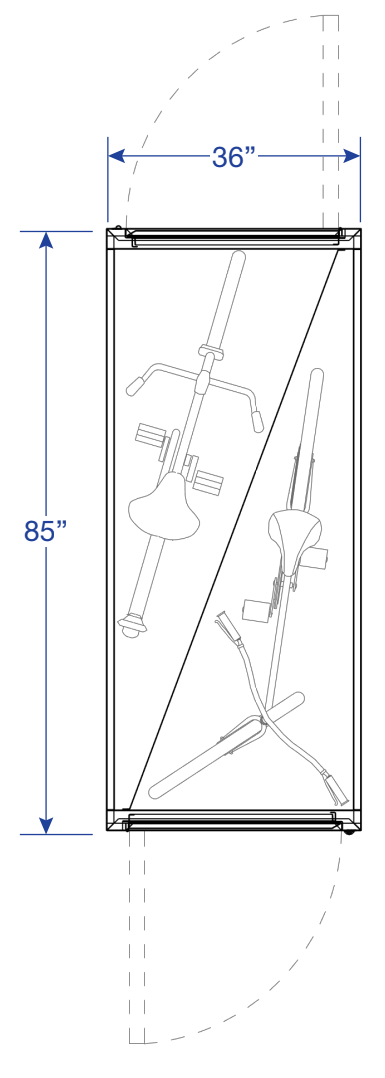
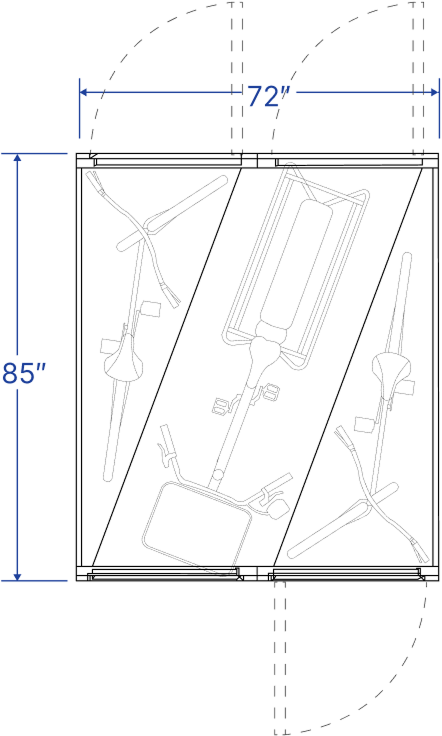
The eLocker door secures the individual space. A secondary bicycle lock is optional, and a security chain is provided inside the locker for additional security. Always close the door completely and confirm that the rental is active before leaving.
If you forgot something inside the eLocker, but would like to continue renting the locker, end the current rental, retrieve the item, close the door, and immediately start a new rental for the space.
If you have already ended your rental, start a new short rental, retrieve the item, close the door, and end the rental so the space returns to service. You will not be charged if you end your rental within 10 minutes.
Do not force the door. Confirm that you are at the correct space and that Bluetooth is enabled on your phone. If you are using the app, then retry once. If the problem continues, call BikeLink Support at (888) 540-0546. When requesting help, provide the Metro Transit location, facility or space number, access method, and a short description of what happened.
Yes. A functioning e-bike may be parked if it fits the selected space and complies with the BikeLink User Agreement and posted safety rules. Gas-powered bicycles or vehicles are not allowed.
BikeLink parking is for a fully assembled, functioning human-powered or electric bicycle or other permitted small vehicle, together with related riding equipment allowed by the User Agreement. It is not general-purpose storage.
Prohibited items include gas-powered vehicles; fuel or volatile chemicals; non-operational vehicles and loose bicycle parts; perishable food; hazardous materials; weapons; illegal items; anything that creates a health or safety risk; and property stored without a functioning permitted vehicle.
BikeLink facilities may use cameras, access records, and other monitoring to support security, operations, maintenance, and enforcement of the BikeLink User Agreement. Authorized personnel may inspect or open a facility when necessary for safety, maintenance, or policy enforcement.
Use of the facility is at your own risk. BikeLink and Metro Transit assume no responsibility for loss by fire, theft, or damage to your bicycle or other property while stored at Metro Transit property. Report the incident to BikeLink Support, file a police report, and report the incident using Metro Transit’s Lost & Found Form. In an emergency or if a crime in progress, call 911. For suspicious activity at a Metro Transit station, Text for Safety at 612-900-0411 and include the location and a description of the issue.
Prohibited items are treated as abandoned immediately. BikeLink will document the issue and make reasonable efforts to contact the user. Per the BikeLink User Agreement, the user has 48 hours to remove the item before coordinated removal, unless an immediate health, safety, or legal concern requires faster action.
Prohibited items are treated as abandoned immediately. BikeLink will document the issue and make reasonable efforts to contact the user. Per the BikeLink User Agreement, the user has 48 hours to remove the item before coordinated removal, unless an immediate health, safety, or legal concern requires faster action by BikeLink and Metro Transit.
BikeLink Support is available 24 hours a day at (888) 540-0546 or support@bikelink.org or in the BikeLink app. When requesting help, provide the Metro Transit location, facility or space number, access method, and a short description of what happened.
Call BikeLink Support at (888) 540-0546. Support will verify your identity and active rental and help you retrieve your bicycle.
For an emergency or crime in progress, call 911. For suspicious or inappropriate activity at a Metro Transit station that is not an immediate emergency, Text for Safety at 612-900-0411. For an equipment problem or access issue, contact BikeLink Support.